CMake Multi-Project Template With Library, App, Tests

CMake is a powerful tool but can also be very complicated and daunting when starting out. Much of my C++ career took place in Microsoft’s Visual Studio on Windows, so I am mainly used to the IDE maintaining the build system and relying on a graphical interface to configure dependencies. I started my WorkTracker utility this way – Visual Studio in combination with the Qt plugin.

Eventually, I migrated to Qt’s build system, qmake, and after that, to CMake. This is how I managed to build WorkTracker on macOS. If I am honest, though, I took a minimalist approach and learned only as much as was necessary to get it working. I like building an application, not knowing about build tools.

As a result, the resulting build script was mostly a hodgepodge of somewhat modern and outdated CMake. My lack of more profound knowledge – which I still do not claim to have – and the convoluted CMakeLists file of WorkTracker somehow presented a mental obstacle for me to start improving it or build other C++ tools.

To remedy this situation, I started looking at the bare minimum modern CMake. I set up a template repository containing a library, an application based on that library, and a Googletest-based testing application. This should provide a good starting point for new projects and give me enough knowledge to slowly start dissecting parts out of WorkTracker and create one or more libraries from it.

Read More »
Package Qt6 macOS App Bundle With Translation Files In CMake

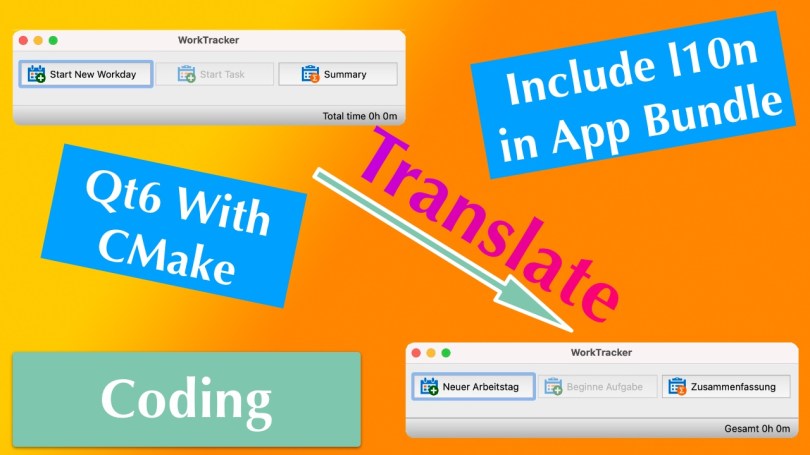
Recently, I wrote about how you can create a macOS app bundle with CMake for a Qt6 application. I omitted the inclusion of translation files, which also required code changes. Well, I figured it out and will briefly explain what I had to do.

In my WorkTracker application, I store the language files in a folder called “l10n” at the project’s root. The first thing to do is instruct CMake to copy the *.qm files to the app bundle’s “Resource” folder. I have done that before for the app icon, and the process is similar for this kind of file.

set(l10n_files
    "${CMAKE_SOURCE_DIR}/l10n/qt_de_DE.qm"
    "${CMAKE_SOURCE_DIR}/l10n/de_DE.qm"
    "${CMAKE_SOURCE_DIR}/l10n/en_US.qm"
)

set_source_files_properties(${l10n_files} PROPERTIES 
    MACOSX_PACKAGE_LOCATION "Resources/l10n")

qt_add_executable(WorkTracker MACOSX_BUNDLE 
    ${worktracker_src} 
    ${app_icon_macos} 
    ${l10n_files})
  1. Define a variable l10n_files that contains all the files.
  2. Tell CMake that these files shall end up in the app bundle, in the “Resources/l10n” folder, to be precise.
  3. Include the files in the call to the qt_add_executable function.
A macOS Finder window showing the contents of the "Resources/l10n" folder in an app bundle.

Now that the translations are part of the bundle, a minor modification to the code tells the application where to find them. The Qt documentation contains a section about using macOS APIs to determine the bundle location. That is not necessary, though. Qt also has a helpful method to achieve the same goal, QApplication::applicationDirPath().

#if defined(Q_OS_LINUX)
    // On Linux the translations can be found in /usr/share/worktracker/l10n.
    auto l10nPath = "/../share/worktracker/l10n/";
#elif defined (Q_OS_WIN)
    // On Windows the translations are in the l10n folder in the exe dir.
    auto l10nPath = "/l10n/";
#elif defined (Q_OS_MAC)
    // On OS X the data is somewhere in the bundle.
    auto l10nPath = "/../Resources/l10n/";
#endif

auto appDir = QApplication::applicationDirPath() + l10nPath;

This method returns the absolute path to the “MacOS” folder inside of the bundle, the folder where the application’s binary is located. Appending /../Resources/l10n/ first navigates up to the “Content” folder (via /..), which is more or less the bundle’s “root” directory, and from there, goes to “Resources/l10n”. Finally, the language files are loaded like on Windows, and the translation works as expected.

I hope this was helpful because I could not find much information on this specific topic.

Thank you for reading.

Package Qt6 App as macOS App Bundle With CMake

The Qt documentation contains all the necessary pieces to create a macOS app bundle. Some steps require CMake configuration, while others require manual labor, i.e., terminal commands. Ideally, you, the developer, want to automate the whole thing and not enter the commands every time you build a release.

You can do that with CMake, and this How-To will show you what to do. I am taking my WorkTracker application as an example since it isn’t just a little toy with an executable binary. It is a fully functional application I use daily at work (albeit on Windows) with icon resources, language files, and several Qt libraries and plugins.

Note: I will not elaborate on the language file topic, as it requires code changes to find the translations in the bundle file. This post focuses on automating the app-bundle creation and setting an application icon.

Read More »

I Bestow Upon Thee “HotkeyAutoExecute”, My Game Screenshot Automator

HotkeyAutoExecute is a simple single-window tool that lets you manage a list of frequently used hotkeys, of which one is repeatedly executed in configurable intervals.

That was the TLDR blurp, and now let’s get into the details. This tool scratches an itch I had in 2020 when I wanted to simplify the process of taking game screenshots for my reviews. During intense gameplay moments, it is difficult to focus on the game and press a keyboard shortcut to take an image of on-screen action. Therefore, I hacked something that would do the job but was not quite baked to be open-sourced as an application. I have changed that now, and boy, was it more complicated than I would have liked.

Read More »

Convert QKeySequence of QKeySequenceEdit to Native Windows Virtual Key Codes VK_*

In a blog post in 2020, I described how to utilize the WinAPI SendInput() function to emulate hotkey presses to automatically take game screenshots for my video game reviews. While I intended to create a simple GUI application to do the task, I ended up with only a hack because of a massive boulder that Windows threw in my way. Or after me, chasing me down a narrow path.

Forget the boulder.

(Although it would be a fitting metaphor to describe Windows: tall, fat, and destructive to user privacy.)

I wanted a simple input field where the user can press a key sequence that will be executed repeatedly at an interval. Qt conveniently provides QKeySequenceEdit for this purpose, and when I tried to insert the Xbox Game Bar hotkey, it did not register. Well, it did, in that Windows took a screenshot. But it was not recorded by the widget. Windows seems to intercept and eat the key presses. That was when I decided to just hard-code my needs and call it a day.

Two years later, I figured that it was about damn time to fix this, and this is where I ran into issues with the translation of key codes from QKeySequenceEdit and QKeySequence to native Windows virtual key codes.

This is where our adventure begins.

Read More »

Apple Silicon M1 for Software Development: Java, C++ with Qt

Apple’s laptops have been making quite the splash since the end of 2020 and have made a massive comeback as a professional tool one year later with the M1 Pro and Max designs. Most of the reviews I have seen focus on the editing and rendering capabilities of these new MacBooks. A few reviewers throw a compile test in the mix, but compiling Chromium or any other huge project is only a part of the equation. Developers don’t just compile code; they also use tools and IDEs to develop their software.

Being new to the M1 world, I wanted to recap my experiences so far briefly. I use Java professionally, and I also have a C++ application based on the Qt framework that I wrote an eon ago and still use productively. Being a former C++ professional, I am about native performance, and I like native software. Therefore, I intended to utilize as many Apple Silicon-native tools as possible. Luckily, one year after its release to the desktop world, the most popular applications have caught up. Let me go through my tool suite one by one.

Read More »

CMake C++ Custom Library on Windows “Undefined Reference” – No Error on Linux

Here is the short version with a quick setup of the situation and the fix. After that, I’ll elaborate a bit.

TL;DR

Setup

I have a custom C++ library and a separate project for tests (all based on Qt 6). The test project requires the library for execution.

Here is a short excerpt of the CMake scripts, first the library, then the tests.

project(wt2-shared VERSION 2.0.0 DESCRIPTION "WorkTracker2 Shared 
Library")

# To export symbols.
add_compile_definitions(WT2_LIBRARY)

# Snip header + source definitions

add_library(${PROJECT_NAME} ${SOURCES} ${HEADERS})

target_include_directories(${PROJECT_NAME} PUBLIC include/)
target_link_libraries(wt2-shared Qt6::Core Qt6::Sql)
project(wt2-shared-test VERSION 2.0.0 DESCRIPTION "WorkTracker2 
Shared Library Tests")

# Snip header + source definitions

add_executable(${PROJECT_NAME} ${SOURCES} ${HEADERS})

target_include_directories(${PROJECT_NAME} PRIVATE ${INCLUDES})
target_link_libraries(${PROJECT_NAME} Qt6::Core Qt6::Test wt2-shared)

Error

This error only occurred on Windows, and it does not matter which toolchain I used, be it MinGW or MSVC. The result was always the same.

The following shows the MinGW error.

[100%] Linking CXX executable wt2-shared-test.exe    
CMakeFiles\wt2-shared-test.dir/objects.a(testdatasource.cpp.obj):testdatasource.cpp:(.text+0x3e5): 
    undefined reference to `__imp__ZN4Data3Sql13SqlDataSourceC1E7QString'
CMakeFiles\wt2-shared-test.dir/objects.a(testdatasource.cpp.obj):testdatasource.cpp:(.text+0x401): 
    undefined reference to `__imp__ZN4Data3Sql13SqlDataSource4loadEv'
CMakeFiles\wt2-shared-test.dir/objects.a(testdatasource.cpp.obj):testdatasource.cpp:(.text+0x514): 
    undefined reference to `__imp__ZN4Data3Sql13SqlDataSourceC1E7QString'	
CMakeFiles\wt2-shared-test.dir/objects.a(testdatasource.cpp.obj):testdatasource.cpp:(.text+0x530): 
    undefined reference to `__imp__ZN4Data3Sql13SqlDataSource4loadEv'
collect2.exe: error: ld returned 1 exit status
mingw32-make[2]: *** 
[wt2-shared-test\CMakeFiles\wt2-shared-test.dir\build.make:142: 
wt2-shared-test/wt2-shared-test.exe] Error 1

Solution

The add_library definition in the CMakeLists.txt was incomplete.
To make it work, I added SHARED because I want a shared library.

add_library(${PROJECT_NAME} SHARED ${SOURCES} ${HEADERS})

Continue reading, though, to get the full picture. There is more to it than just making the library a shared one.

Read More »

CMake on Windows 10 with Qt5 Error: CMAKE_PREFIX_PATH

Quick one: Set the proper CMAKE_PREFIX_PATH value for Qt5 development on Windows 10 with MinGW and CMake.

Here is the lovely error you get from CMake.

CMake Error at CMakeLists.txt:13 (find_package):
 By not providing "FindQt5.cmake" in CMAKE_MODULE_PATH this project 
has
 asked CMake to find a package configuration file provided by "Qt5", 
but
 CMake did not find one.

 Could not find a package configuration file provided by "Qt5" with 
any of
 the following names:

 Qt5Config.cmake
 qt5-config.cmake

 Add the installation prefix of "Qt5" to CMAKE_PREFIX_PATH or set 
"Qt5_DIR"
 to a directory containing one of the above files. If "Qt5" provides a
 separate development package or SDK, be sure it has been installed.

CMake asks you to tell it where to find the Qt5 *.cmake configuration files. One option is to set the CMAKE_PREFIX_PATH variable. The Qt5 documentation has the following to say about that:

The easiest way to use CMake is to set the CMAKE_PREFIX_PATH environment variable to the install prefix of Qt 5.

Now, what the hell is the "install prefix"? It turns out it is the path where you can find the compiler-specific Qt binaries, include files and the other stuff. In my case, using MinGW, it is located at "C:\Apps\Qt\5.14.2\mingw73_64". If you are using the MSVC binaries, select the corresponding directory, probably something like "C:\Apps\Qt\5.14.2\msvc_2017".

Automate Game Screenshot Capture: Windows API SendInput Function with C++

I am trying to write video game reviews after I have finished a game and I like to add some impressions in the form of screenshots to the reviews. There is one problem though: sometimes it is impossible to press the keyboard shortcut to capture a screenshot because the game requires my full attention – and all my fingers. Therefore, I miss out on a lot of action sequences. What does a programmer do in such a situation? Write a tool that scratches the itch.

Read More »

Comparing Java Optional vs C++ STL optional

Optionals in Java have been around for some time now, basically since the release of version 8. My other language of choice, C++, has received this feature in version C++17. Since I am currently in the process of writing some C++ code, I was curious how they were implemented there. Optionals are trying to solve a problem that is likely to plague any language. What shall a method or function return if there is no value? Or shall it not return anything but instead start crying like a petulant child and throw an exception?

As an introduction, let me dive a little bit into why we need optionals (or do we?) and compare two different implementations of this concept, one being java.util.Optional and the other C++ std::optional. I chose to compare these two language for several reasons:

  1. I work with Java in my day job, so I have a good idea of how it works there.
  2. As mentioned, C++ is one of the languages I know quite well too.
  3. The main reason: both optional implementations are add-on classes rather than language features. More on that later.
Read More »

WorkTracker 1.4.0 Released

Yes, you read that right. I have released a feature update for my WorkTracker tool. There was one little annoyance that I worked around by using copy and paste and since it was just a few key strokes, I didn’t bother. But in my renewed motivation to do some coding, I thought that it’s about time this issue goes to hell. And now it’s being grilled by Lucifer.Read More »

enable_shared_from_this: boost vs. std

If you are a modern C++ developer, then you are probably using some kind of smart pointer implementation. The boost C++ libraries offer one possible solution (among many other useful features) and are generally held in high regards in the C++ community. With the latest C++11 standard, some of those ideas found their way into the standard library bundled with your C++ compiler. At some point, you very likely run into a situation where you need a shared_ptr of one of your classes, but only have a raw pointer or this available.

This is where enable_shared_from_this comes in. Boost and the standard C++ library provide this feature and they both have a very important prerequisite for this to work.
Read More »

The Pitfall of Trying to Be Too Smart When Using dllexport/dllimport

As a seasoned C++ developer I should’ve been aware of this which makes it a little bit embarrassing. But, since this issue has cost me several hours of searching through the Internet over the course of two or three days, I thought it might be worth sharing. Maybe somebody else is trying to be too smart or just doesn’t know better.

The problem? It is summarized in short in this StackOverflow question that I posted. With this blog post I’ll be a bit more elaborate and show some details.
Read More »