
I have recently treated myself to an AM5 system on an MSI B650 Tomahawk WIFI. The R5 7600 has access to 32 GB of G.Skill 6000 MT/s CL32 memory, which supports AMD’s EXPO technology. Enabling EXPO worked fine for the first hour before the trouble began.
At first, the SSD wasn’t detected anymore. I wanted to reinstall Windows because of licensing issues since I chose the wrong edition at first. Then, changing settings in BIOS did not restart the computer. The BIOS just froze up. Finally, the CPU and memory EZ Debug LEDs were both active, indicating a fried CPU and RAM.
That was a fun experience.
The Debugging
For reference, here is the layout of the debugging LEDs.

I am showing you this because the image of the error was under bad lighting conditions.

Whatever I tried, the system appeared to be dead. No more BIOS, no CMOS reset, nada. A CMOS reset had no effect even when the system would still boot into BIOS. Cutting the power… you guessed it: did nothing.
In a last hurrah, I attempted to boot with only one memory stick installed. Maybe it was just a single DIMM that unleashed hell. Lo and behold, the system booted. Testing the other stick also booted. Trying both RAM sticks again also booted. What the devil?
Changing the RAM configuration from two sticks down to one triggered something in the BIOS to reconfigure itself. A BIOS often shows a message when changes to the previously installed hardware are detected. And suddenly, a BIOS reset also worked.
The Fix
This time, I ran the RAM at 4800 MT/s while I installed Windows and tested a game for good measure. After ensuring the system was stable, I dared to perform a BIOS update.
And this was the solution to the problem. My MSI B650 Tomahawk came with BIOS version E7D75AMS.160; the latest version is E7D75AMS.170. The changelog mentions several improvements regarding RAM support.
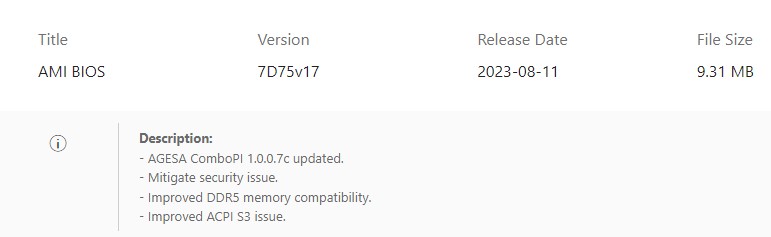
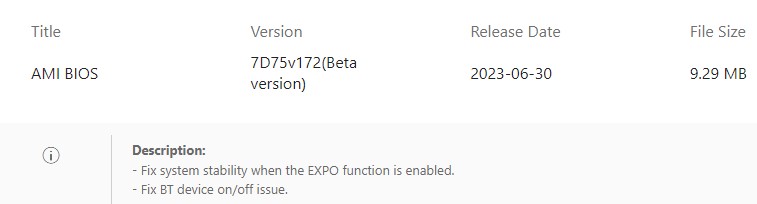
An unreleased beta version also mentions stability improvements with EXPO enabled. I assume this also made its way into the latest release.
Since then, the system has been stable. I have run several benchmarks and played Starfield for about four hours straight without any stability problems.
The Disappointment
I am shocked that users can still run into compatibility issues like this about a year after the release of the Ryzen 7000 processors. The original installed BIOS was published in May 2023. That was already about eight months after the release of the AM5 platform, and it still had issues.
I hope this was helpful and saved you some time debugging a similar issue on the same motherboard or even a different one that behaves the same.
Thank you for reading.



 The Codeslinger