Apple, Stop Parenting Me – Rant About iOS 14 Auto-Volume Reduction

Apple is a company that tends to believe it knows best what its customers want. Sometimes a company – not specific to Apple – does actually know better than the customer. Apple has been very active in the past years to push customer health and provide hardware, the Apple Watch, and software, the Health app, to facilitate this push in the form of products they can sell. I do not own an Apple Watch, but I genuinely view it as a good thing.

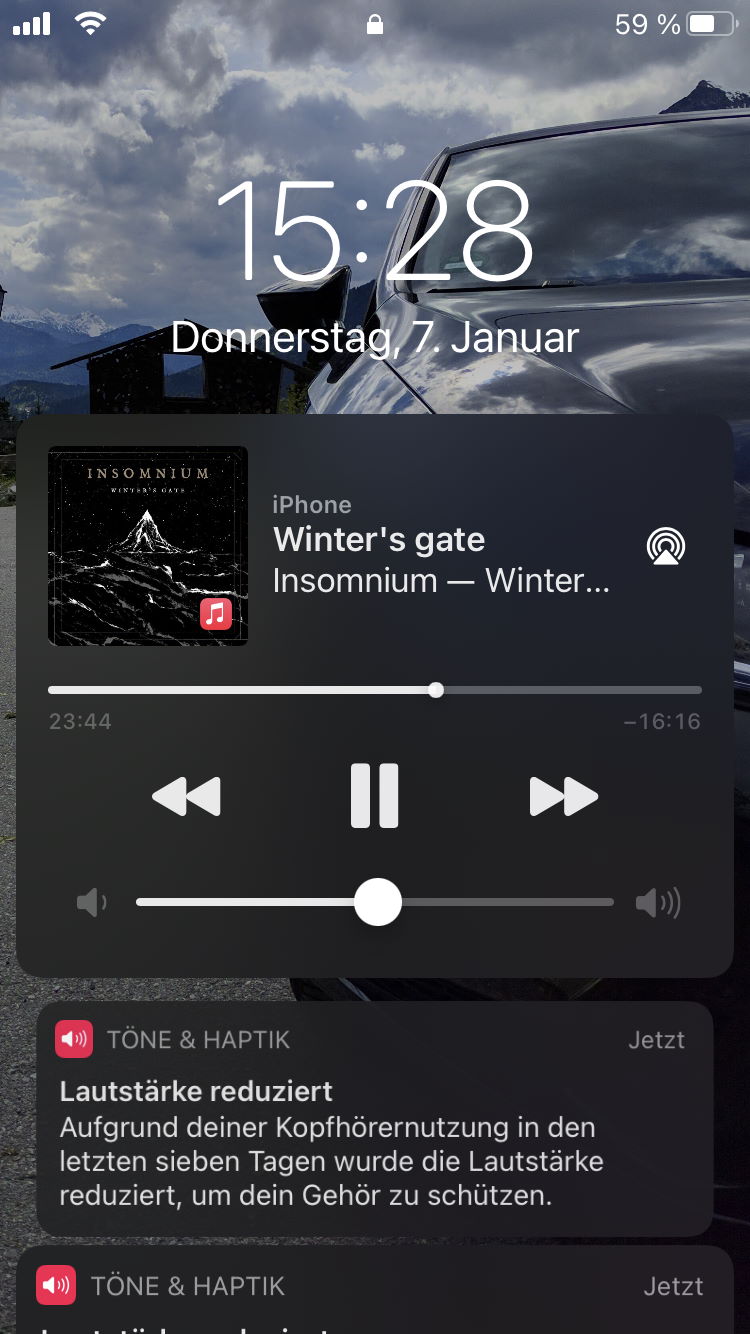
Now, with iOS 14, Apple has gone a bit too far with regards to health monitoring. It now enforces rules I, the customer and user of a device, cannot override. I am talking about the automatic volume reduction when iOS thinks I have been listening to loud audio for too long.

This is not okay!
This is not a situation where a company knows better.

It is actively limiting its product’s usefulness to me, the customer who paid a lot of money for it. I understand the motivation, but I cannot condone the action taken. Apple cannot even know why I turn up the volume to levels it deems inappropriate for a more extended period.

Here are a few examples, some of which already happened to me.

  1. Bluetooth-pairing the phone with my car’s audio system.

    I usually crank the phone’s volume to max to roughly match the other audio sources, like music on a USB stick (yes, I am a cave-man that has music on a stick).

  2. Listening to podcasts while going for a walk or run next to a busy road.

    Imagine my surprise when the voices speaking to me seemed to have disappeared because iOS lowered the volume to a point where the audio was drowned by traffic noise. I thought my phone had died – which has happened often enough thanks to an iOS bug that incorrectly reported battery percentage and dropped from 30% to turning off within 15-20 minutes.

  3. Listening with studio headphones that have a high input resistance (in ohm).

    I recently bought a new pair of headphones, and the quickest way to compare them with my old ones was to plug them into my phone. 80 Ω is not a lot, but enough to have to crank up the volume a bit higher to get a decent fun level. In the end, it is still much quieter compared to my PC soundcard that supports up to 600 Ω headphones.

No. 1 has not yet happened, but I assume it might once the world is rid of the COVID-19 pandemic, and I can/must travel to work a couple of times per month. On longer car rides, I usually listen to podcasts, and as mentioned, I turn up the volume on my phone in those cases. The other two issues have already managed to annoy me, and No. 3 prompted me to write this little rant – although that is the least likely of the three examples to occur regularly. Most of the time, it will be No. 2 when I am out walking or going for a run. The traffic noise is much worse than people talking to me. I am not even listening to music, which is also worse than people talking to me. I prefer Apple to turn down the car noise on the roads instead of my headphones. Until they can do that, stop messing with my volume, please.

(Is this a ploy to get me to buy horribly expensive AirPods Pro with
noise cancellation?)

I can agree that a notification is a good start to educate users. But please do not take any automatic action. At least make it configurable. I am an adult, and I should be able to decide for myself. On top of that, there are legitimate use-cases where a higher "theoretical" volume is required.


Linux Gaming: Middle Earth – Shadow of Mordor; Get it to run, and run it fast

Gaming on Linux is a challenge because only a few companies take the time to create native Linux ports of their games. It is even more challenging when those natively ported games do not run at all or do not run well. One of them is Middle Earth: Shadow of Mordor. I have bought this game specifically because it has a native Linux version – and because I remember that it was well received by media and players.

This game has two issues:

  • It refuses to start in full-screen mode.
  • The performance is terrible.

Let’s go through these two issues and see how they manifest and how to fix them.

Read More »

Pop!_OS Linux Fixing Windows Dual Boot Problem

In a previous blog post I have mentioned that I was not able to add my Windows 10 installation to the Grub boot menu. I have finally found a solution. Now, in my last Linux blog post I mentioned that I ultimately gave up on Linux after trying Ubuntu 20.04. Well, I could not stop thinking about it. I am on Pop!_OS again and although I did not disconnect any SSD on installation, Pop! did not detect Windows 10 and add it to Grub itself. So, I was back at where I started.

Quick recap of the setup: I have two SATA SSDs (yes, SATA, like a cave man), one with Windows 10 (the Crucial MX500) and one with Pop!_OS Linux (the Samsung 850 Evo). The bootloader for each OS is on the respective SSD.

Now, enough background, let us get to the solution!

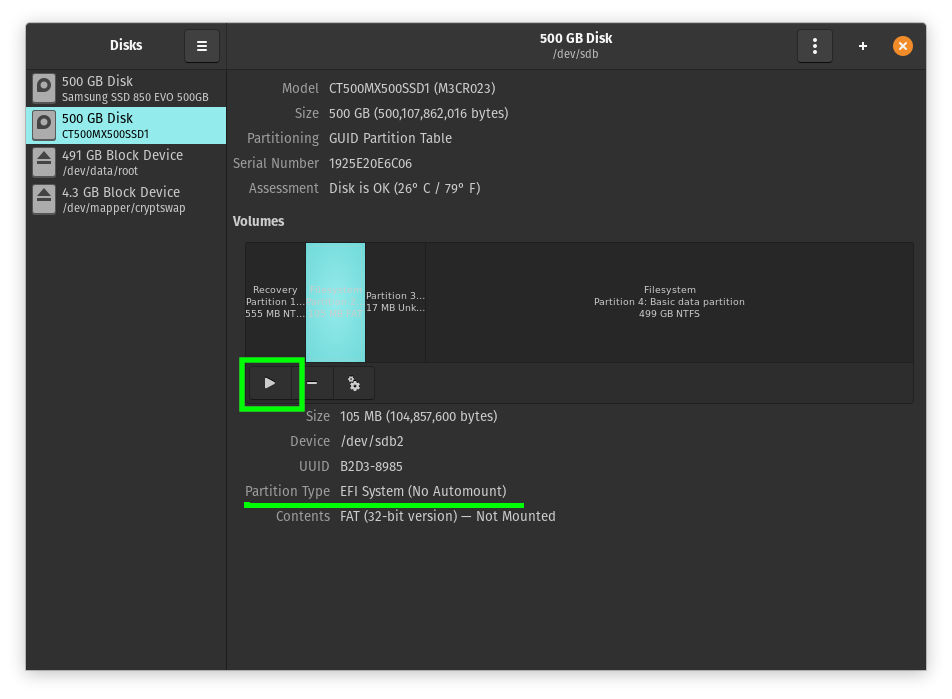
If you are CLI wizard do your thing, I will be using a convenient UI for the first step. Open “Disks” and locate the Windows 10 EFI partition. It’s around 100MB in size. Once you have found it, click the “Play” button to mount it.

The Disks utility will then display the mount point that is required in the next step.

Now, copy some Windows 10 Boot files to your Linux /boot folder. Yes, you read that right. Sounds weird, but it did the trick.

Do this with Nautilus or use the following command (which I recommend). Replace <mount point> with the path you got from the Disks utility. Note that path completion does not work once you go past /boot/efi. The EFI folder exists, you merely do not have permissions to see it as a regular user.

sudo cp -r /<mount point>/EFI/Microsoft /boot/efi/EFI

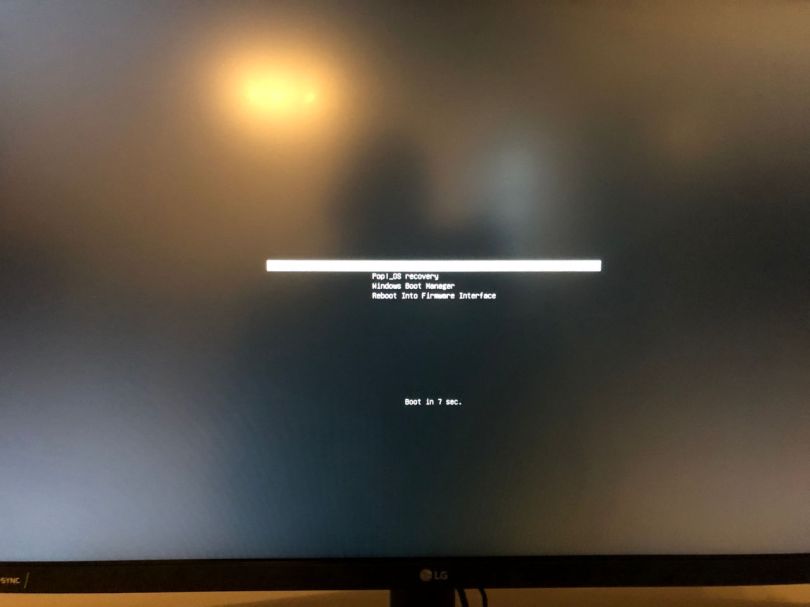
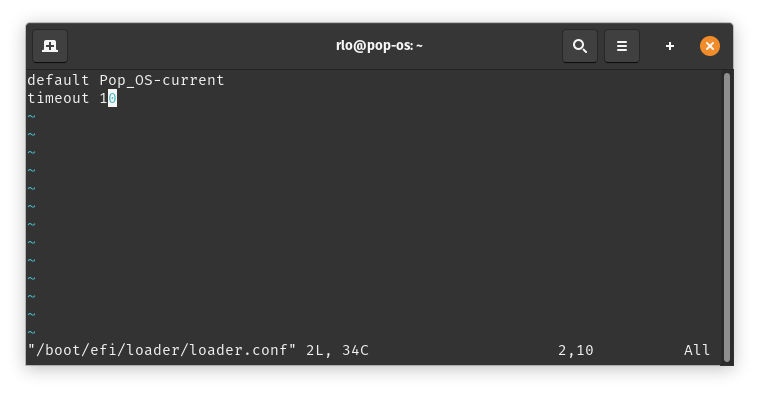
The last step consists of making the boot menu show up so you can actually select an entry. Edit loader.conf and add “timeout 10” (or any amount of seconds you prefer).

sudo vim /boot/efi/loader/loader.conf

All you need to do now is reboot and (hopefully) enjoy a boot menu with your Pop!_OS and Windows 10 boot entries. I do not know if this procedure also works with other Linux variants. It might for the Ubuntu based distributions, but I cannot say.

The Worst “Accept Cookie Policy” Implementation

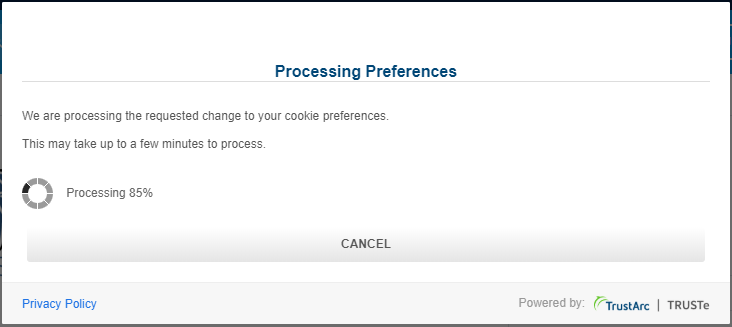
All the cookie policy notifications on every website are a nuisance in and of itself. There is one special kind however, that not only bugs you to accept it, but also throws a giant blocking “dialog” in your face that prevents you from using the site while it’s doing… well… I have no friggin’ clue what it’s doing. What I know is that it takes forever to get out of my way.

There’s not much content here other than this short rant about this terrible TrustArc / TRUSTe cookie accepting widget thingy that takes about a minute to do its thing. Why do websites add this to their page? Don’t they test it first? Does that save so much time in development that annoying the users is worth it? How much does that tell you about a website’s owner? I hate these things!

Debian Testing “Bullseye”: The Repository Does Not Have a Release File

After installing Debian Testing "Bullseye" mid March 2020 I got an error trying to run apt update.

E: The repository 'http://security.debian.org./debian-security 
bullseye/updates Release' does not have a Release file.

Unfortunately, the Debian maintainers managed to let a bug creep into the /etc/apt/sources.list. It’s called "Testing" for a reason, I guess.

The offending lines are this.

deb http://security.debian.org/debian-security/ bullseye/updates main
deb-src http://security.debian.org/debian-security/ bullseye/updates main

Note "bullseye/updates", which is where the error is. Change those two lines to look like this.

deb http://security.debian.org/debian-security/ bullseye-security main
deb-src http://security.debian.org/debian-security/ bullseye-security main

After that, the update will work. I have noticed that in a later version of the installer this bug has been fixed.

Debian Testing “Bullseye”: NVIDIA Driver Install

Debian’s documentation on installing the proprietary NVIDIA driver does not (yet) cover the "Bullseye" release because, as of the time of writing, it is still in testing. However, the documentation for Debian 10 "Buster" can still be used.

The main difference is that there is no "backports" for "Bullseye" – although I have found the folders on repo mirrors. At least to me they seemed to be there. Anyway.

What you have to do is to add "contrib" and "non-free" to your main mirror definition, not to backports. You don’t need to add a repo for backports because you’ll only get an error.

(Unfortunately, I haven’t made a note of the error message)

This is what you have to do:

  • Open /etc/apt/sources.list as sudo/root.

  • Add "contrib" and "non-free" to the end of the main repo so it looks like this.

    deb http://deb.debian.org/debian bullseye main contrib non-free

(The observant among you might have noticed that the feature image is from a Pop!OS installation, not Debian. I’ve since changed the distribution.)

Ryzen Master not Resetting to “Auto” Control Mode

Recently I set out to figure out how much clock speed I can squeeze out of my Zen+ based Ryzen 5 2600. To make life easier I figured I use Ryzen Master so I can change the settings while I’m in Windows so I don’t have to reboot every time I increase the clock speed. This has worked nicely until the point where I figured the viable maximum was. The next step was to dial those numbers "into hardware", meaning setting the options in the BIOS so that Ryzen Master is not required any more. And this is where my issues started to appear.

The Error

First, here’s a screenshot of the message Ryzen Master was giving me. After that I’ll explain what had happened.

In order to set the CPU multiplier you have to change from automatic to manual mode in Ryzen Master. I wanted to reset all options to their defaults after setting the overclock in the BIOS, but I always kept getting the message that Ryzen Master wants to restart Windows because the setting was changed to "Manual" – which it wasn’t, but more on that later. So I did as it asked multiple times with the same outcome every time. Effectively, I was doing a boot loop manually.

So, how did I get there?

The Journey

In brief:

  • Find a stable overclock in Windows using Ryzen Master.
  • Reboot to BIOS and set the overclock closer to the hardware.
  • Reboot to Windows and reset everything in Ryzen Master.
  • Manual "Boot Loop" a few times.
  • Notice CPU always at 4GHz, no more Cool’n’Quiet operation mode.
  • Undo overclock in BIOS.
  • Still see overclock in Windows.
  • Uninstalling Ryzen Master.
  • Still see overclock in Windows.
  • Ryzen Master still not resetting.
  • Manual "Boot Loop" a few more times.
  • Getting pissed and searching the Internet – apparantly I was not alone.
  • More reboots and tests with BIOS settings.

The Fix

It was the frickin’ BIOS! Ryzen Master was not to blame.

I have an ASRock B450 Gaming mITX mainboard with the latest non-Matisse (Ryzen 3000) BIOS. It is not recommended to upgrade unless a Ryzen 3000 is installed. There’s a weird bug in the BIOS that still applies the overclock even if the setting is set to "Auto by AMD CBS" (or something like that). There were two things that helped:

  1. Load BIOS defaults.
  2. Enable manual control and set the correct CPU base frequency at 3400MHz.

When applying the overclock with 4000MHz it effectly ran at 4GHz every time, even in idle. When setting 3400MHz it properly clocked down and also boosted as a R5 2600 should. The same setting only with a different clock value produced a different behavior. And unless the BIOS defaults are loaded the "Auto" mode doesn’t do what you expect – if you’ve set an overclock previously.

Curiously enough, booting Fedora Linux from an USB stick did properly scale the CPU frequency based on the load, even with the overclock applied. Apparently only Windows or AMD’s drivers didn’t manage to do that. Booting a Linux helped me to rule out Ryzen Master as the root of the always applied overclock although the BIOS setting was set to the default Auto mode.

The takeaways:

  • Don’t overclock on this mainboard.
    • The OC options for the CPU are laughable at best. No way to set the multiplier per core.
  • Next time buy a higher-end mainboard for overclocking (ITX is expensive though…).

Of Affordable Phones, Software Updates and Yearly Upgrades

With the release of the Google Pixel 3a I once again started thinking about what I want in a smartphone. As a reminder, the last time I was pondering the purchase of one I was musing of tall phones, curved displays and notches. I am not in the market for a new phone right now as my iPhone 8 is more than capable of fulfilling my needs. But, with the recent launch of the Pixel 3a I wished that this device had already existed a year ago because it is basically the perfect phone for me. And I also wish Google would get back into the market of less expensive phones with the latest and greatest hardware as was the case with the Nexus line.

Read More »

Writing a Custom Backup Solution

If you are a user of any form of computer and care one bit about your sanity, then you probably have a backup strategy. Otherwise, if all hell breaks loose and your whole computer burns to ash or the hard drive melts to a heap of metal, turning it into an ugly door stop, you’ll likely be kinda angry, maybe slightly pissed, your pulse most definitely at 180, that you’ve lost all your data. I’d certainly be, especially about all my pictures of all the festivals and places I’ve been to. 

(And maybe some family 😅)

But, to be honest, I’ve been a bit lazy about backups for some time now. I do have copies of all my important files, but that’s not a backup. It’s a copy. A backup lets you go back in time and get an older version of a file or folder, not just the most recent one that has been synced.

So why is it, that I’m not as diligent as I should be? There are a few factors in that equation. It’s laziness for one, knowledge that I do have at least one copy, the fact that I haven’t had any data loss so far and stinginess. Why the latter? Up until now, being a Windows user (not any more though, on my main machine), I was relying on Acronis True Image, a commercial backup software. However, the version that I own – 2014, I think – stopped being reliable in one of the past Windows 10 versions. I simply don’t want to spend the money any more.

I’m not here to tell you that I have changed my mind on that. No. I’m, of course, coding my own solution. Why wouldn’t I? Everything is done multiple times in the Open Source community.

Read More »

Of tall phones, curved displays and notches

This is a rant about modern smartphone design. I’ve had a few ideas in my head for some time, since MWC 2018 in fact, but never bothered to write them down as it was only focused on this notch thing that keeps on spreading. However, recently my sister’s phone died – thanks for the boot loop issues LG (it was my Nexus 5X that I passed on to her) – and so I helped her searching for a suitable replacement.

Although there are plenty smartphone makers out there, our go-to list wasn’t very long. For one, we had ruled out LG from the start. It seems that the Nexus 5X wasn’t the only one with recurring hardware defects. The next ones that didn’t make it to the list were basically all Chinese manufacturers like Huawei, Honor, ZTE or Xiaomi. I understand that they make very good handsets, especially Huawei has upped their game, but I do have my doubts regarding software updates. The last time I had read about the Android update situation sometime last year, these companies didn’t have the best track record (I don’t have the link to the website anymore, sorry). In fact, just throwing it out there, some Android phone manufacturers even lie about the patch level of their firmware.

<Insert your preferred curse>

Read More »

Windows 10: First Impressions (Preview Build 10041)

While I was grooming my unicorn on Crazy-Talk Island I read on the Internet about a thing called Windows 10. Curious as I am, I went out to watch the huge presentation on Jan, 21 where Microsoft officially unveiled the mobile version of Windows 10 and the cool hardware stuff. There’s also a very nice set of videos by Scott Hanselman on YouTube that show the changes from version to version.

Actually I’m very much aware of Windows 10 since the beginning, as a developer I’d be crazy not to, so I registered as a Windows Insider yesterday and downloaded the technical preview build 10041. Here’s a summary of my first impressions.
Read More »

Windows 8.1: One Year Later – I Get It Now

Windows 8 wasn’t all too well received, hardly a secret if you follow the tech press, neither by customers nor by businesses. There are a few folks who like it but they are, like those Windows Phone enthusiasts (that really do exist), a very minor minority (without report).

*Ahem*

About a year ago, I started using Windows 8.1 as my main operating system (which I’ve written about a few months later). Before, it was just a necessity to get the Soundblaster audio card to work. However, going through the same positional-sound problem again after upgrading from 8.0 to 8.1, I’m sure using Windows 8 fixed the problem by accident. Creative’s drivers are just a bulk load of crap, as they’ve always been. Had I not had the iMac as a work computer at that time, I’m not sure I would’ve installed Windows 8 instead of 7, but rather gotten rid of the Soundblaster Z. If you’ve read the post about the sound card, you know I was one of the many people that had an axe to grind with this OS.
Read More »