Gaming on Linux is a challenge because only a few companies take the
time to create native Linux ports of their games. It is even more
challenging when those natively ported games do not run at all or do
not run well. One of them is Middle Earth: Shadow of Mordor. I have
bought this game specifically because it has a native Linux version –
and because I remember that it was well received by media and players.
This game has two issues:
It refuses to start in full-screen mode.
The performance is terrible.
Let’s go through these two issues and see how they manifest and how
to fix them.
In a previous blog post I have mentioned that I was not able
to add my Windows 10 installation to the Grub boot menu. I have
finally found a solution. Now, in my last Linux blog post I
mentioned that I ultimately gave up on Linux after trying Ubuntu 20.04. Well,
I could not stop thinking about it. I am on Pop!_OS again and
although I did not disconnect any SSD on installation, Pop! did not
detect Windows 10 and add it to Grub itself. So, I was back at where
I started.
Quick recap of the setup: I have two SATA SSDs (yes, SATA, like a
cave man), one with Windows 10 (the Crucial MX500) and one with
Pop!_OS Linux (the Samsung 850 Evo). The bootloader for each OS is on
the respective SSD.
Now, enough background, let us get to the solution!
If you are CLI wizard do your thing, I will be using a convenient UI
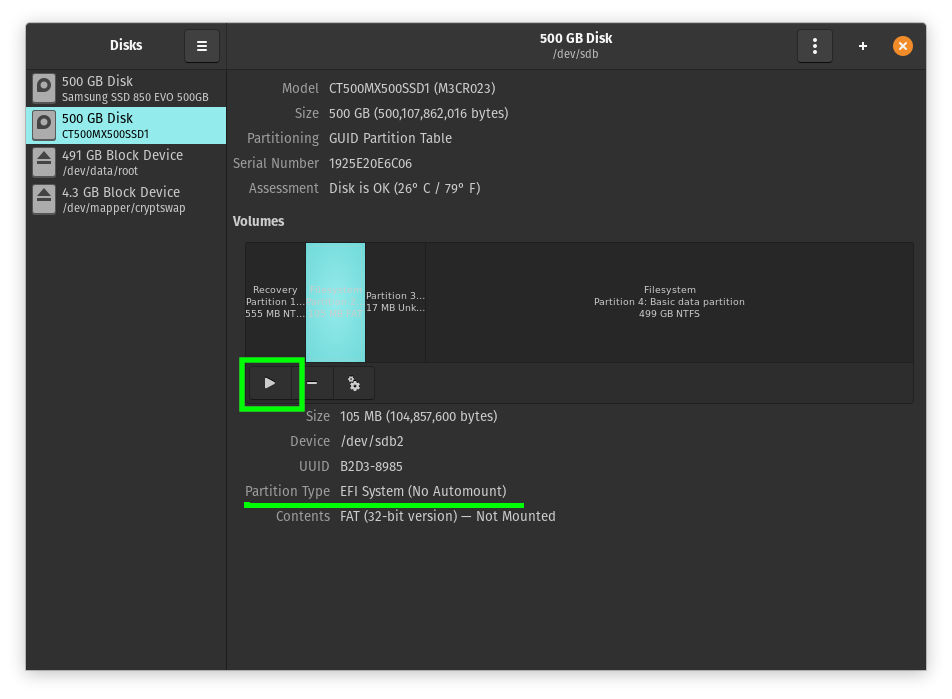
for the first step. Open “Disks” and locate the Windows 10 EFI
partition. It’s around 100MB in size.
Once you have found it, click the “Play” button to mount it.
The Disks utility will then display the mount point that
is required in the next step.
Now, copy some Windows 10 Boot files to your Linux /boot folder. Yes,
you read that right. Sounds weird, but it did the trick.
Do this with Nautilus or use the following command (which I
recommend). Replace <mount point> with the path you got from the Disks
utility. Note that path completion does not work once you go past
/boot/efi. The EFI folder exists, you merely do not have
permissions to see it as a regular user.
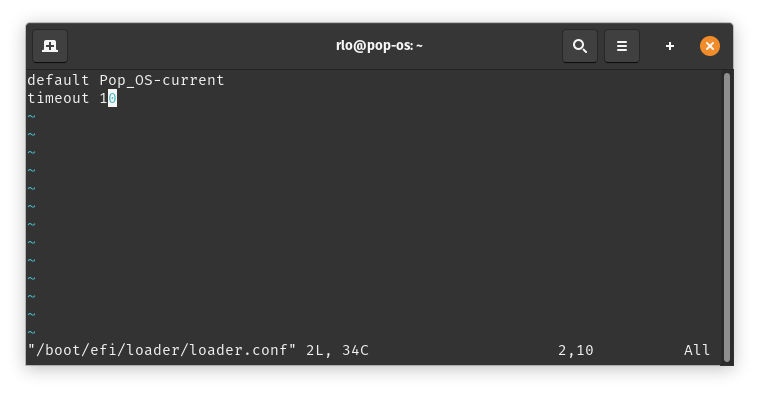
The last step consists of making the boot menu show up so you can
actually select an entry. Edit loader.conf and add “timeout 10”
(or any amount of seconds you prefer).
sudo vim /boot/efi/loader/loader.conf
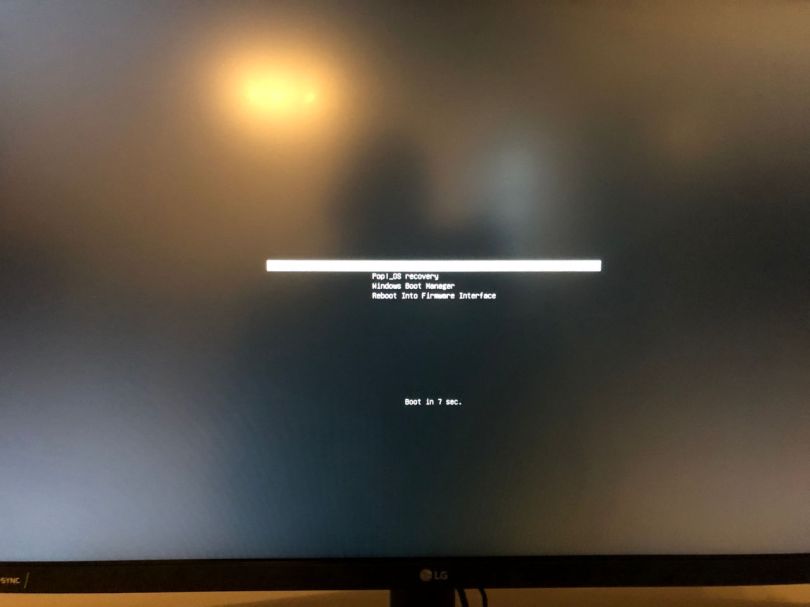
All you need to do now is reboot and (hopefully) enjoy a boot menu
with your Pop!_OS and Windows 10 boot entries. I do not know if this
procedure also works with other Linux variants. It might for the
Ubuntu based distributions, but I cannot say.
A few months back now I have written about how I was trying to use
Linux as my main operating system. I will not reiterate my motives
here. If you are interested feel free to read the initial story back
from March. In my one-month-later story I was
already having some doubts, but continued to stick with it.
Update, 2, July 2021
I have found another tool that I now prefer. Read this blog post to learn more, or read this blog for yet even more information 😉.
In my quest to move to Linux as a daily driver it was important for
me that I could continue to use Microsoft’s OneDrive cloud storage.
Unsurprisingly, Windows 10 comes bundled with a OneDrive sync client.
There is no official Linux support though, so I had to resort to a
3rd party tool. Luckily, there is a very powerful utility called
rclone that does almost exactly what I want and I’ll explain how
I have it set up to suit my needs.
Spoiler: it’s not as convenient as Microsoft’s sync client, but it
has other things going for it.
It has been roughly a month since I switched from using Windows 10 as my main operating system to Linux. The reasons for that have all been detailed in The Switching Windows to Linux Experiment blog post. Now I will share a few of the experiences I have made during the first month (it’s been that long already) and what I think about how well it is going.
Let me address the elefant in the room first, the distribution. I think that is likely the first question you, the reader, would ask. The short answer is Pop!_OS by System76.
Debian’s documentation on installing the proprietary NVIDIA driver
does not (yet) cover the "Bullseye" release because, as of the time
of writing, it is still in testing. However, the
documentation for Debian 10 "Buster" can still be used.
The main difference is that there is no "backports" for "Bullseye" –
although I have found the folders on repo mirrors. At least to me
they seemed to be there. Anyway.
What you have to do is to add "contrib" and "non-free" to your main
mirror definition, not to backports. You don’t need to add a repo
for backports because you’ll only get an error.
(Unfortunately, I haven’t made a note of the error message)
This is what you have to do:
Open /etc/apt/sources.list as sudo/root.
Add "contrib" and "non-free" to the end of the main repo so it
looks like this.
deb http://deb.debian.org/debian bullseye main contrib non-free
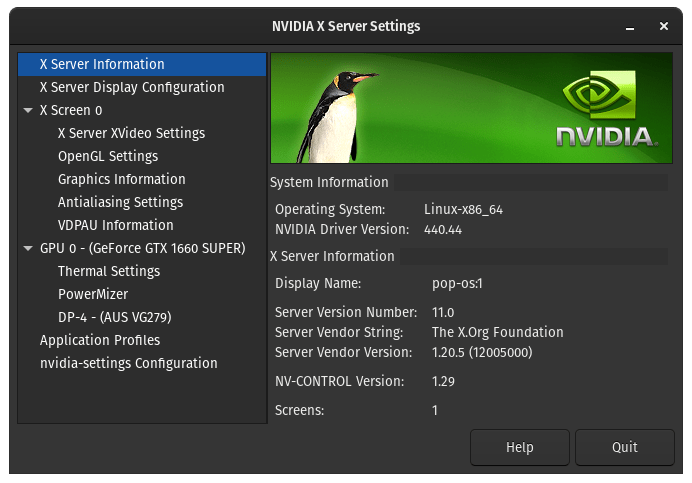
(The observant among you might have noticed that the feature image is from a Pop!OS installation, not Debian. I’ve since changed the distribution.)
For the longest time I have been a Windows user. My first computer
came with Windows 98 SE (ignoring the Amiga before it) and I’ve used
Windows as the main operating system for almost all that time since
then. There was a brief excursion into the Apple world for about a
year or two, but apart from that: Microsoft’s creation. It’s not that
I have not tried using Linux, it’s just that for many years my needs
could not be easily satisfied by a Linux based operating system. For
one, I have always enjoyed PC gaming and I still do. I’ve tried going
with a console, but that was one of the worst decisions I had made in
2019. There also was a long period where I had used my computer as a
TV, a time where Youtube and all the other streaming services hadn’t
existed. And although I had managed to get the TV tuners to somehow
work, it was not comparable to the experience on Windows. For my use
case, over all those years, Microsoft’s OS simply was the Vulkan
choice. But now in 2020, this isn’t the case anymore. Things have
changed, including the maturity of Linux as well as my own needs and
my views. Therefore, it’s about time that I revisit this topic.
With the release of the Google Pixel 3a I once again started thinking about what I want in a smartphone. As a reminder, the last time I was pondering the purchase of one I was musing of tall phones, curved displays and notches. I am not in the market for a new phone right now as my iPhone 8 is more than capable of fulfilling my needs. But, with the recent launch of the Pixel 3a I wished that this device had already existed a year ago because it is basically the perfect phone for me. And I also wish Google would get back into the market of less expensive phones with the latest and greatest hardware as was the case with the Nexus line.



 The Codeslinger