
If you regularly watch Gamers Nexus benchmark videos or are just a strategy game enthusiast, Total War may be a name you recognize. It has been quiet as far as “Mystery Games” go in the Epic Games Store, but at the end of the year, Tim Sweeney handed out a household name in the strategy space for free. I took this opportunity by the hand to check out Total War for myself and, of course, also benchmark it.
And with that, I welcome you back to another Linux versus Windows benchmark battle.
I usually prefer to do a Gameplay Performance first, before diving into the benchmarks. However, I’m sad to say that Total War: Three Kingdoms just isn’t my cup of tea. Therefore, I spent only as much time in the game as I needed to record some B-roll and get the testing done.
But enough foreplay. Let’s get to the climax and the question of who’s packing more heat.
Yes, you heard that right. And there’s plenty more where that came from.
Benchmarking Preamble
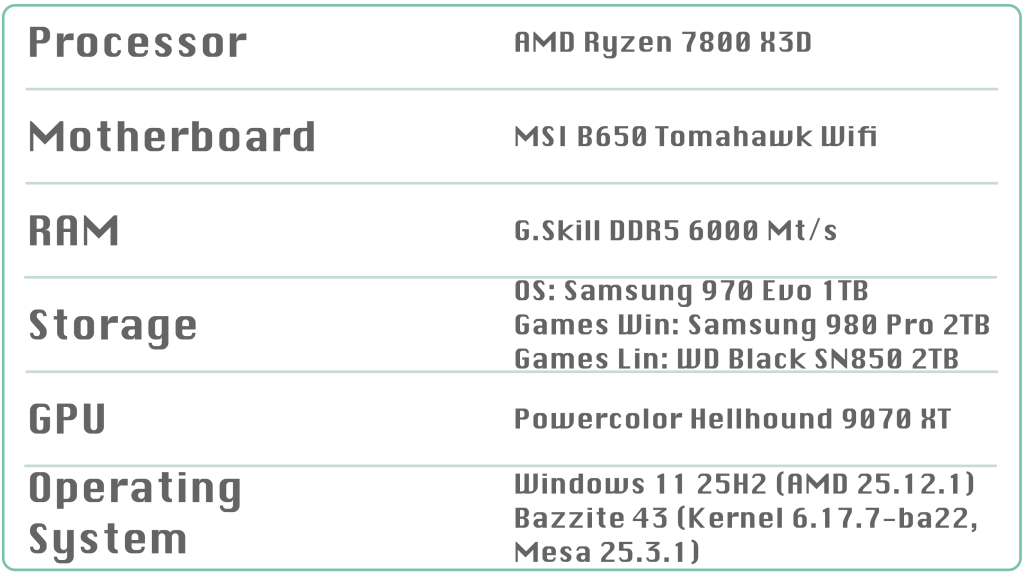
As usual, let me give a brief overview of the hardware and software. Bazzite 43 and Windows 11 are up to date as of January 2nd, 2026. I disabled Core Isolation and Memory Integrity Protection in Windows 11. All Windows-to-Linux translation is handled by Proton-GE 10.28. Since this is an Epic Games Store title, I used the Heroic launcher and utilized its “Add to Steam” feature to play conveniently in Steam Gaming Mode.
For this benchmark, I relied entirely on the built-in battle benchmark. In my view, it’s the only way to test the same scenario repeatedly with a high degree of consistency.
I tested the presets Medium, High, and Ultra, and manually cranked every dial to its maximum. For each preset, I ran each test at least three times and calculated the average. The resolution is native 1440p.
Let’s now get to the measurement contest.
Medium
Total War is a mature game released in 2019 and built on DirectX 11. Consequently, the FPS pushed to your monitor are quite voluptuous. The “Low” preset could push even further, but it’s not particularly stimulating visually, so we’ll start with “Medium”.
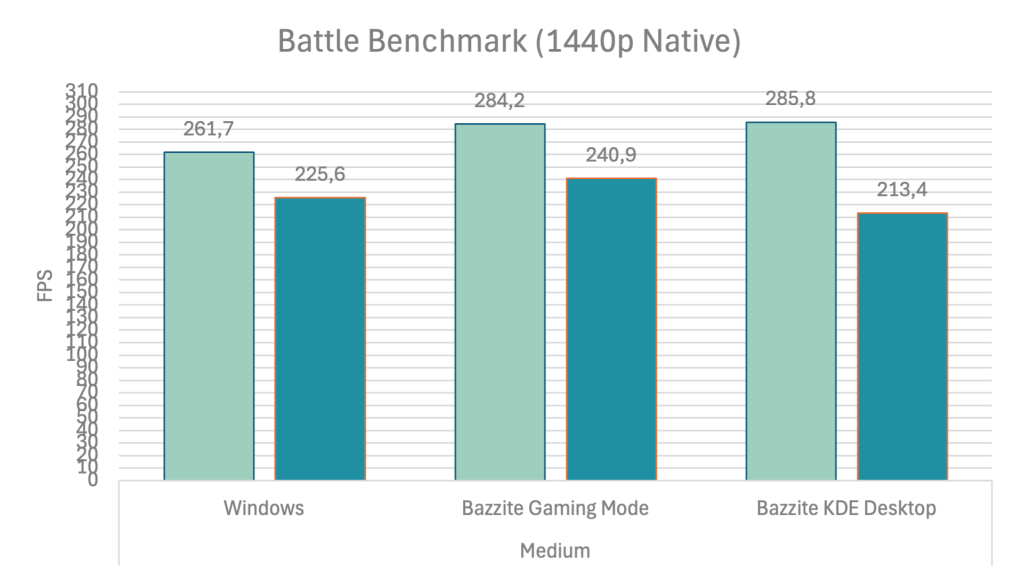
Windows sets the bar very high, rendering 261 frames per second. But compared to Linux, this result is modest. Bazzite has more stamina and produces a hefty 285 FPS. In Gaming Mode, Valve’s full-screen experience, the 1%-lows are also higher compared to Windows. Interestingly, the KDE desktop cannot keep up with either competitor here. As impressive as the FPS numbers are, the advantage is still only 9% on average and 7% in the 1%-lows in the ideal case.
High
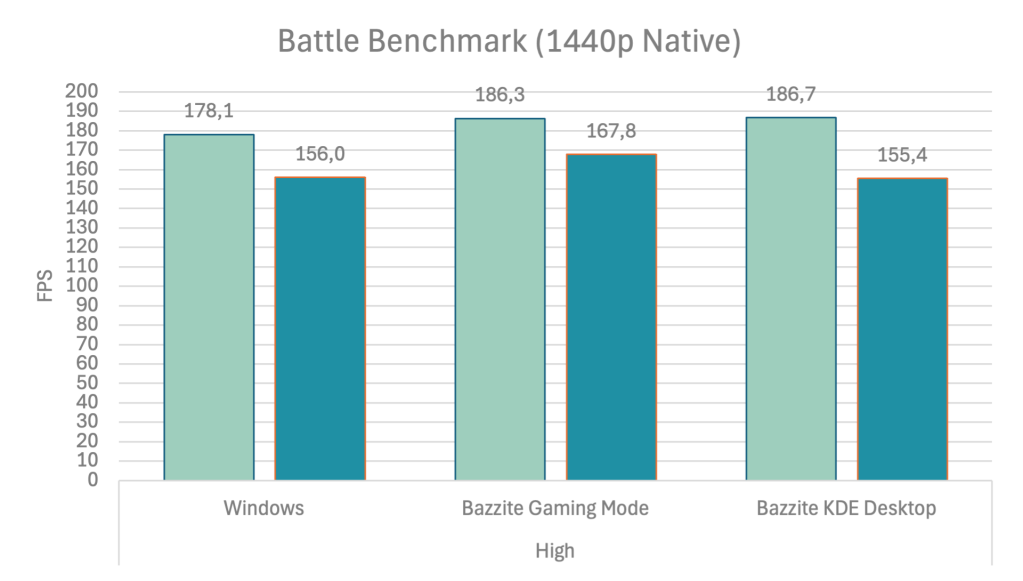
Once I enabled the “High” preset, all contestants moved closer together. Both Linux variants continued to lead Windows by 5%. Steam Gaming Mode still keeps its distance in the 1%-low department with an 8% lead, while Windows and the KDE desktop are evenly matched.
It looks like all systems are starting to get intimate.
Ultra
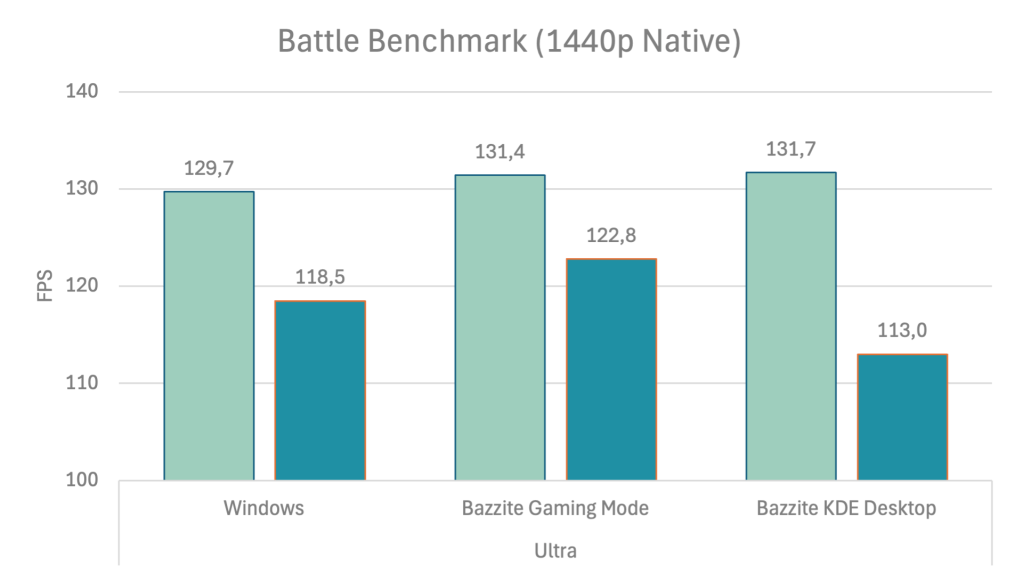
At the nominally highest preset, everyone is essentially on the same level. Linux holds its ground on average, with 2 more FPS than Windows and 4 more FPS at 1%. The KDE desktop trails Windows by 5 FPS. In practice, you won’t notice either the advantage or the deficit.
Neither system shows any signs of premature exhaustion.
Manual Maximum
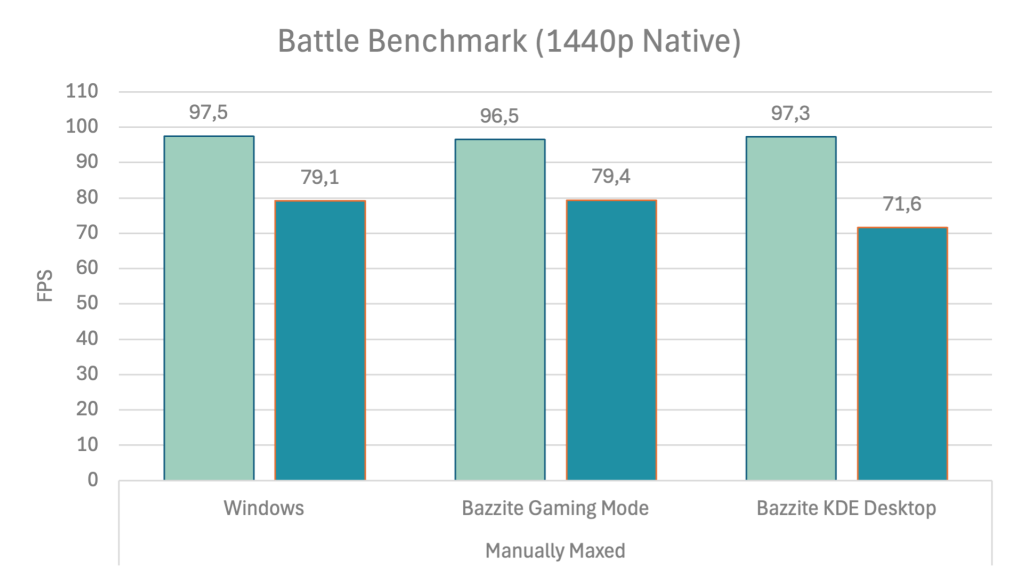
Total War offers a few options beyond the Ultra preset’s defaults. So, we can pop the blue pill and crank everything to the max for that extra bit of visual satisfaction. Unlike real life, the performance drops notably here, but it can still satisfy the urge for grand strategy. Except for the KDE desktop’s 1% values, all systems are effectively the same. For unknown reasons, the desktop goes limp 9% earlier here.
Famous Last Words
Total War Three Condoms… uh… Kingdoms, Kingdoms (!) runs exceptionally well everywhere, but is a bit more gratifying on Linux, which is usually Windows’ forte.
However, Linux is not without its quirks. The desktop occasionally lags behind, and I noticed visual glitches in Steam Gaming Mode during the benchmark runs. Since I wasn’t sure they would show up in the footage, I recorded my monitor on my phone.
That said, I didn’t notice any artifacts during my roughly 30-minute play session, though, and on the desktop, this wasn’t an issue at all. I strongly suspect the Steam version is unaffected. I used Heroic’s Steam integration and played in a Gamescope session, which likely caused this phenomenon. I think it’s also worth mentioning that a native Linux version exists on Steam for this game. But only there, not on Epic or GoG. But even if the native version is faster, you don’t really need it here. Nevertheless, it’s nice to see developers taking the time to port their games.
Additionally, the game regularly crashed to the desktop shortly after loading the benchmarking scene. However, I strongly suspect Mangohud as the source, as it was a non-issue in Steam Gaming Mode. As I learned recently, the overlay behaves differently on the desktop and in Steam Gaming Mode.
And with that, we’re done with this uncomplicated quickie.
If you enjoyed this little in-and-out, I’d appreciate a thumbs-up and a subscription on YouTube. Maybe something serious will come of this.
😉
Thanks for spending your time with me today. Have a good morning, afternoon, or evening wherever you are on the globe.
 The Codeslinger